Showing posts with label Advice/Tools. Show all posts

Wednesday, February 22, 2012

Framework Update 1

I thought I'd post a few screen shots of my work on the new framework so you get an idea of what I'm doing. Rather than 6 (or 7 or 8) setting library tokens, I've collapsed this down to two for the new framework: Lib:Rules and Lib:Setting.

Lib:Rules contains all the macro code while Lib:Setting contains all the data. In theory, you can swap setting tokens with ease. You just point the Rules token to it for data.

The heart of the Setting token is a set of lists containing all the stuff needed by the rules. This is where you'll add the names for things like Arcane Backgrounds, Skills, Derived Stats, Edges, and Hindrances. If you don't need a particular skill, like Guts, you simply remove it from the list and the code will ignore it from that point forward.

The screenshot below shows the results of the Manage Setting macro.


Another goal of this framework is to allow for internationalization. I do this through the Languages and Labels tab. In it you can pick a language and then edit the text to suit the needs of your games. I did this mostly for the German Savages that use my framework but I hope others will make use of it as well.

To change the language you simply select it from the dropdown. To edit the text you click on the label name which brings up a dialog to let you edit the translated text. Note you can also use this to alter the displayed English text as well. All text on the screen goes through this lookup regardless of language.

I can see already I'm going to need to code a utility to import labels from one Lib:Rules token to another.


After you have the lists defined, you can start configuring the setting under the Configuration tab.

  • Races, Monstrous Abilities, Edges and Hindrances all work the same by adding, replacing, or modifying traits and stats defined on the lists page. 
  • Derived Stats are those called out in the Savage Worlds rule set for things like Toughness, Charisma, and Parry. 
  • Other Stats include things that are modified by Edges, Hindrances, and Races but fall outside other stats (like Soak roll modifiers). 
  • Arcane Backgrounds have their own set of screens to configure power point usage, powers, skill name, initial power points, and initial powers. 

To configure these items, I've created Wizards to ease data entry. Below is a simple example from Derived Stats. Items with a formula ignore the default. Formulas must follow a specific format. In the case below, Parry and Toughness get the Die Num (i.e. 4 for a four sided die) of a trait and perform some math on it.


That's all for now. I'll post more as time allows.

Thursday, February 16, 2012

The Blog Post You Should Never Publish

I know you should never post explaining why you haven't been posting. Still, I've never let common sense stand in the way of publication.

I've been hard at work creating a new Savage Worlds framework for MapTool. The effort has several goals including:
  1. Internationalization - GM can change the labels on the screens so non-English speakers can use the framework.
  2. Full integration of race, edges, hindrances, and monstrous abilities on trait rolls. You have to define these for the setting but it works really well.
  3. Custom definitions of arcane backgrounds. I want something that handles Hellfrost, Solomon Kane, Realms of C'thulhu, Necessary Evil, the Companions (Fantasy, Super Powers, Horror) with ease.
  4. Wizard-based configuration to help with setup.
  5. Setting based rather than character sheet based - the last framework started and stayed centered around the character sheet. The new one is centered around the setting with the character sheet as one of the products.
  6. Multiple deck support - the new framework will handle any number of adventure and action decks.
  7. Group movement and initiative
  8. Gadgets, equipment, and artifacts - probably one of the biggest changes is gear definition. Rather than have 4 types of gear (weapon, armor, ammo, and other) all gear will be configured the same  where you assign different aspects to the gear. One of the new aspects will be powers. This will help greatly with Weird Science gadgets. 
  9. and much, much more.
So I'll be gone for a bit, probably a few months. Derek B will be filling in with some reviews and other tidbits. I'll try to get some posts up showing the new framework as well.

Thanks for all your support.

Monday, January 16, 2012

Google Hangouts with Extras for RPG

Friday night I played Warrior, Rogue, and Mage from Stargazer Games. game with my longtime online gamers I met through MapTool. As always, we had a great time.

Matt Jackson - cartographer, book cover designer, and the master of 20,000 rules-light games - wanted to try a Google Hangout with Extras for maps, character sheets, and handouts. I'm a longtime MapTool fan and serve on the RPTools.net staff so I suspect I'm more than a little biased.

MapTool does all of those functions very well and was custom designed with gamers in mind. Still, I tried to go in with an open mind. I suspect the two glasses of wine I had beforehand helped. What follows are the Good, the Bad, and the Frustrating about Google Hangouts for RPGs.


The Good.

This is a web application and so needs no client software or special plug-ins to play. As long as you have a Google+ account you have access. I suppose some would consider forcing you to use Google+ is an overall minus but I suspect those people are still trying to figure out a way to get Facebook usable for RPGs.

Google Hangouts with Extras has great integration with Google Docs. You can store documents, spreadsheets, pdfs, etc. in Google docs and share them during the game. You can share only with certain members or open an entire folder up for the group to use.

Google Sketchpad integration is nice as well. Sketchpad is an drawing/image sharing program that lets everyone in the Hangout draw or drop images onto a common canvas. This was the way we shared maps and moved our tokens around the maps.


You can open both Sketchpad and Docs in a separate tab or window if you need multiple items open at once.

The new Hangouts has full text, voice, and video chat capabilities. You don't need a third party product. The picture and voice quality were both good. The text chat comes in handy for sharing AFKs and BRBs as well as typing out quips versus saying them.

The Bad

There is no built in die roller. I hear there are online sites that let players share dice rolls but I haven't found a good one yet. During the game we rolled actual dice and shared the result via the voice chat. While I trust the guys I game with, others may not be so lucky. Isn't it time all text chat programs came with built in die rollers? Let's start an occupy Google campaign (via hangouts) until we get it.

The Sketchpad functionality is fairly limited. It does OK and is good for getting a point across but it really isn't built for gaming. The objects you place on the screen don't have a way of annotating ownership. Sketchpad only tells you who has the object selected. One of the major problems is that the map is an object just like the tokens. So anyone can grab and move it around. Adding layers to Sketchpad would go a long way to making it more usable for Gaming. Player tokens could go on one layer and background objects on another. Let's start an occupy Google campaign (via hangouts) until we get it.

The Frustrating
  • It's not MapTool, a product designed for gaming. It's a presentation/discussion tool. I spent a lot of extra clicks doing what comes easy in MapTool.
  • There wasn't an easy way to zoom around the map.
  • The accidental map movement drove me nuts when people selected the map rather than their token.
  • Images could not be named and had no owner. It was hard telling who was who and what they were doing.
  • You quickly run out of screen real estate for viewing different documents and images.
Conclusion

A Google Hangout is what it is: a method of sharing documents with chat and whiteboard built in. You can make due if you don't expect a lot from it. I hope they someday publish an API for Hangouts that VTTs connect into so you can let VTTs do what they do well and Hangouts do what they do well.

Still, if your mapping needs aren't large and you do more storytelling than combat, Hangouts may be the right gaming tool for you.


Friday, January 6, 2012

Kindle Fire Apps for the Gamer

I use my Kindle Fire a great deal for gaming and writing research. It's handy form factor makes it extremely portable and the ability to load my PDFs onto the device means my gaming library is with me where ever I go. The long battery life allows me to use it for days between charging and my Verso leather(ish) cover that makes the Fire look like a leather-bound book. For some reason I like that a lot.  

Currently I'm wading through the new chase rules in the Savage Worlds Deluxe Edition and making notes along the way for a future blog article. Along the way I decided it to document the Android applications I use daily so other gamers considering a Fire purchase could gain from my experience.

My first and foremost favorite application is ezPDF Reader Pro by Unidocs Inc. The program makes great use of screen real estate and navigation is a breeze. 

The File Management screen allows you to view a list of your PDFs you've sent to your Kindle, those you've downloaded, or you can open a PDF directly from the web. I use the 'Recently Viewed' option most often because I usually reference more than one PDF for research. 

Thus far, ezPDF does the best job of reading PDFs. The default Kindle viewer displays PDFs and that's about it. If you're going to make your Kindle into a gaming book reader, you need much more. The ezPDF view behaves like a standard Kindle reader when in full screen mode complete with page flipping animation. Full page is normally too small to read unless the Kindle is sidways.

When you double tap a text column, it zooms so the column fills the screen. After that, tapping either side of the screen scrolls to the next or previous text column. Touching the top or bottom of the screen scrolls to the top or bottom of the page. All this makes for a great navigation experience although it's a little frustrating at first.

Selecting text is easy. You simply hold down on a word and a selection highlighter appears allowing you to select all the text you want. Once your selection is complete, you can 
  • Copy - saves the selected text to clipboard to be used later
  • Search document for other occurrences of the selected passage
  • Web - sends the selected text to Google search
  • Send - sends the selected text to other applications like Facebook, Twitter, Email, or Evernote
  • ColorDict - sends the selected text to ColorDict application (not available on Kindle but should be there for other android devices)
  • Highlight, strike through, or underline text
  • Add sticky note
  • Draw figures, freehand, or text boxes on the document
The ezPDF menu appears with a single tap to the center of the screen. From the menu you can
  • Search
  • Bring up the outline for quick navigation between book sections
  • Goto or add a bookmark
  • Browser like navigation to visit previous pages if you're jumping around in the document
  • Jump to a page number
  • Set the zoom %
  • Export/Import/List Annotations
  • Voice reading to have your Kindle read to you
  • Auto flipping to have the Kindle automatically navigate through the PDF
  • Night/Day mode which inverts the colors light to dark or dark to light
  • Save As to save a copy of your PDF
Next on my Must Have list is Evernote. This free application makes note taking easy and puts notes on the cloud for access on all android devices and any web browser. I use Evernote as I'm reading game manuals to save off interesting tidbits for later. My current article involving chase rules has me back and forth between the Savage Worlds Deluxe Edition and the Space:1889 - Red Sands setting rules trying to figure out the best way to handle Sky Galleons combat. Since the chase rules have changed, keeping track of all the information was becoming difficult. 

Evernote to the rescue. I cut and paste the relevant sections from ezPDF into Evernote giving me one place to absorb the information. What's more, you can share documents with other Evernote users and all your notes are automatically on all your Evernote devices. It comes in very handy. 

You can also embed media, such as photos and videos, into your notes. 

Another app from the Evernote folks is Skitch. The application lets you rapidly annotate photos and images the share them with others. It's simple functionality but incredibly useful for passing maps and other graphics back and forth. 

You can add arrows, boxes, text, and freehand drawings to your graphic and then share them via email, Twitter, Facebook, Evernote, or other apps. 

Skitch is easy, fun, and I spend too much time in it. 

Sketchbook Pro is last on my list Must Haves. Sketchbook is a great little drawing program for rapidly putting together maps or other graphics. It's something of a mini-GIMP or Photoshop with a wide variety of brushes and other tools to make drawing easy. 

You can confine drawing to squares, circles, lines, or use freehand. There are 45 brushes to choose from with variable radii and opacity. It has a mirroring mode so one side of the drawing duplicates the other. Best of all it has 6 layers which allow you to draw on different, overlaid canvases. The three transformation tools - rotate, move, and scale - are simple and intuitive. 

For a quick drawing, nothing beats Sketchbook. What's more, you can always save your drawing then annotate in Skitch and save in Evernote. It makes for a powerful combination. The image below took me less than five minutes to create and share. I drew the image in Sketchbook, annotated in Skitch, and saved to Evernote as well as shared to Twitter.

Please forgive the crudity of the model. I was in a hurry.


I don't edit Microsoft Office documents on my Kindle often but when I do I use QuickOffice Pro. It is your standard office suite with a word processor, spreadsheet, PowerPoint, and PDF viewer. The nice thing about QuickOffice is its ability to work from a variety of cloud sources such as Google Docs, Dropbox, Evernote, Catch, Egnyte, Huddle, Box, SugarSync, and MobileMe.

The product works with all  recent versions of Microsoft Office Word, Excel, and PowerPoint files.  While this probably doesn't fall into the Must Have category, I do use it often for game-related materials.

Tuesday, January 3, 2012

Tools: Space 1889 Ship Builder

I'm creating some new campaigns with Cloud Ships for Space:1889 - Red Sands. Part of the effort involved porting over my old Cloud Ship designs to the new Savage Worlds format. Part way through I decided to create a tool to allow for the rapid creation of the ships. Of course, the development of the tool took longer than converting the four ships in question but at least now I have a tool for future efforts.

I decided to share this in case others wanted to build their own Ether Ships, Sky Galleons, or Cloud Ships. The tool is a spreadsheet originally developed in Open Office. I ported it to Excel but sometimes that causes problems. So far the worksheet seems to work fine.

The Spreadsheet is protected, meaning you can only change certain portions of the sheet (yellowish cells). There is a second sheet containing the weapons available for your ships. Only the 'Number' column is editable. The Sheet 1 is updated with the crew requirements, cost, and weight reflecting changes to Sheet 2.

I recieved permission from Shane Hensley and Frank Chadwick to release the spreadsheet. I'm putting the finishing touched on now add a few macro buttons for convenience.

Below I included a preview of the Blood Runner ported from Sky Galleons of Mars.


My only issue right now is the ability to allow the users to add their own image next to the ship description. I've had some initial luck but the formatting still isn't quite right. I should have it ready by Friday along with a BIG announcement for next Tuesday.

My SPACE:1889 efforts continue. Next up is the MapTool campaign file for aerial ship battles. I have a number of tokens done already. Here are a few samples. Soon the screw galley Pride of Texas will ply the skies of Mars again. Belgians beware!

Clearsight

Endtime


Hullcutter


Sky Runner


Friday, December 30, 2011

SPACE:1889 - The Burning Desert

The Savage Troll is proud to present a new MapTool/Savage Worlds module set in Frank Chadwick's SPACE:1889 setting which was Savaged by Pinnacle Entertainment Group in Space:1889 - Red Sands. The module comes from Tales from the Ether, a SPACE:1889 supplement available on DriveThruRPG.

The adventure begins as one of the characters receives a letter from an old school chum requesting help on Princess Christiana Station on Mercury. Attached to the letter is a newspaper article concerning tin prices. Foul things are afoot and he needs your help. The characters must survive the bitter cold, tropical river, and burning desert of Mercury if they wish to solve the mystery.

The MapTool campaign file comes complete with all handouts from the original module, a detailed map of Princess Christiana Station, two vehicle tokens, 5 player character tokens, and over 8 NPC tokens for use in this and other SPACE:1889 - Red Sands adventures.

The Burning Desert requires both Space:1889 - Red Sands and Tales from the Ether to play.

To download the adventure, simply right click on the download link, 'Save As' to the directory of your choice, launch MapTool (yes, it's just that easy), and load the campaign file in MapTool. If you have any questions, visit the Framework page followed by the FAQ page.

Related Links:
Review of Space:1889 - Red Sands
The Making of The Burning Desert
Space 1889 Pregen characters from The Savage Troll
Space 1889 Pregen characters from Pinnacle Entertainment Group


Products of Interest
Tales from the Ether ($3.95 for 5 adventures easily converted to Savage Worlds/Red Sands)
Space 1889 Adventure Bundle ($7.95 all 4 adventure products for 1889 including Tales from the Ether)
Space 1889 Product Bundle ($39.95 for everything published by GDW for Space 1889)

Red Sands Players Guide ($14.95 all the rules you should need for this adventure)
Red Sands ($24.99 full rule book)


Tuesday, December 20, 2011

Review - Kindle Fire - the Good, the Bad, and the Must Have


I'm moving away from books to PDFs and eBooks. Books, by their physical nature, require their presence to be useful while, with a suitable device, you can view electronic media anywhere. Electronic media also has the advantage of easy bookmarks and text searches. While it might seem romantic to curl up with a book by the fire or in bed at night, my age dictates I need a strong light and reading glasses for any such endeavor. An eReader or Tablet solves both those issues.

As long time readers will know, I've long looked for a product to hold my gaming PDFs that is portable and versatile. I investigated various tablets and eBook readers but none seemed to fit the bill. The basic problem being that eReaders don't do PDFs well and Tablet Computers don't make for great readers.

As time passed, the two markets began to merge. Tablets became more reader-friendly while readers became more tablet-ish. Eventually even the products' operating system became the same, Google's Android. So I waited for the right product at the right price.

My wife finally put me out of my indecisive misery and purchased a new Kindle Fire for my birthday. I have ever said how awesome she is?

Because some of you are trying to make a decision, I'm going to give a bulleted list of the things I like and dislike about the product. An explanation will follow along with a list of 'must have' applications for your Kindle.

Likes and Dislikes

Monday, October 10, 2011

MapTool Objects as Handouts

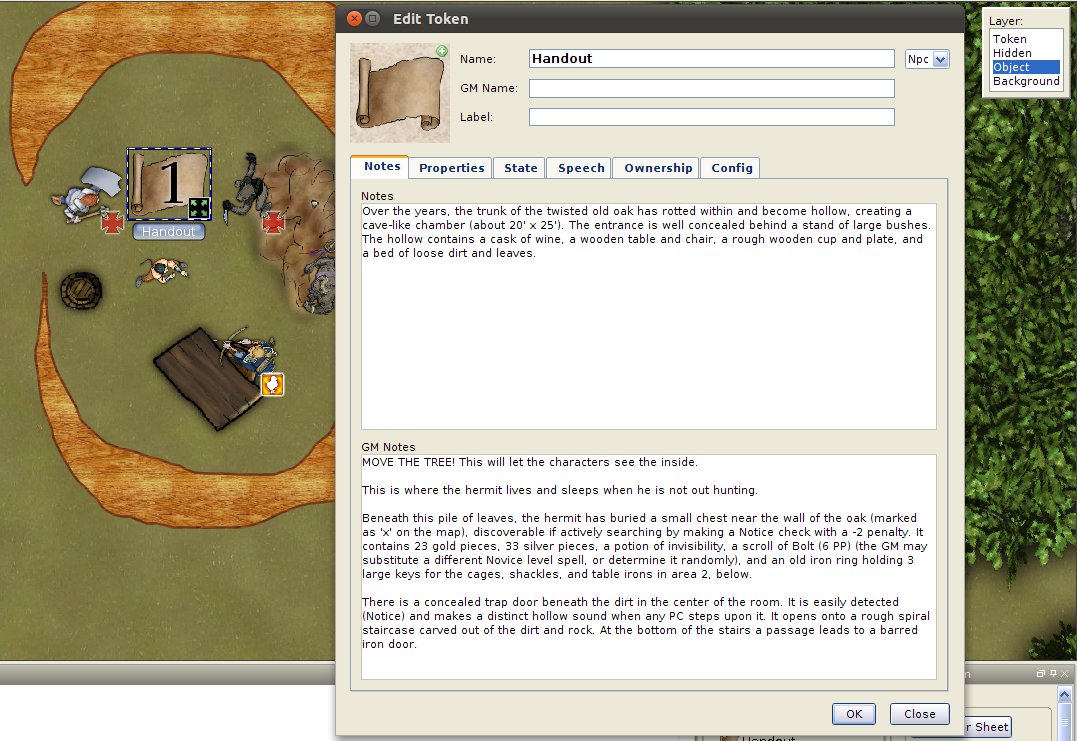
An often over-looked capability of MapTool is the ability to attach descriptions to objects you place on the map. As you know, MapTool has for image layers: Token, Hidden, Object, and Background. Anything you draw or place on the map will go on one of these layers. Token images are confined to one grid square and are drawn over everything else. Hidden objects are only visible to the GM. Object images are clickable and are drawn between the background and other layers. Background images are 'under' all other images. Where an image or drawing resides depends on what layer you select when you drop or draw on the map.


For my fantasy campaigns, I use the scroll image (donated to RPTools by Jonathan Roberts of Fantastic Maps) to indicate a player text handout for room and object descriptions. When clicked, the scroll's Notes and GM Notes appear over the map in the lower left corner. Players only see the notes along with the token the name e.g. Handout in this case. GMs see both the Notes and GM Notes that reside on the object.


To place notes, double click on the image while on the proper layer. Note, you can't click an object while you have the Token layer selected. You'll forget this . . . often.  Once double-clicked, the dialog box below appears for note entry. Note that the '1' in the image below is actually on the Hidden layer. Players can't see that but I, as the GM, can.  


I also use GM notes to include reminders to myself. In this case I had the tree canopy covering the 'room'. During play I moved the canopy off to the side and placed it on the Hidden layer so the players couldn't see it. You can do a similar trick with rooftops covering buildings. In the past I've included tactics as well as any traps the players might set off. Speaking of traps, placing a trap symbol on the hidden layer along with a trap descriptions is a great GM tool as well.


As always, to find out more about MapTool functionality visit the RPTools forums or the fan wikiSpecial thanks to Devin Knight for the tokens, Jonathan Roberts for the objects, and Brave Halfling Publishing for the room description from 'The Vile Worm of the Eldritch Oak'.

Friday, June 3, 2011

MapTool Look and Feel

There are somethings that really bother me about MapTool. I really want a more immersive experience. There’s too much crap on the window,” Matt said at a recent game. Matt is a long time MapTool user.

You know you can unpin the window and they’ll disappear until you need them,” Bryan said.

You’re Sh**ing me! I didn't know it could do that. Still, we're stuck with these colors. Why can't I make MapTool purple if I want?”

"You can," I said. "You just need to change the default theme."

Thus the conversation went a few weeks back during an Old School Hack game with Matt, Bryan, Alessandro, Rob, and myself. I have some sympathy for Matt. MapTool is a simple program to launch and use but it has many features that aren’t well advertised or understood. Part of this has to do with the fact it was developed with a lot of input from it’s user base. Group think is sometimes hard to document. This article attempts to let MapTool users know a few of the intricacies of the MapTool User Interface (UI). 

Sunday, May 15, 2011

Announcement: New Member of MapTools Staff

The MapTool Gang of 3 decided to add a new member to their group: The Bard. They placed the  following advertisement on the RPTools.net forum.
We have an immediate need for an individual with strong enthusiasm for MapTool (and RPTools in general) who is willing to join the project team as our Director of Public Interfacing (herein referred to as "The Bard"). The job will entail periodic discussions with the developers regarding the future of MapTool and acting as the team's public persona. The former will include input on such things as usability, opinions on graphics layout, ideas for features, and so forth. The latter involves interacting with users to provide a positive first experience for them. This includes, but is not limited to, demo sessions showing off the basic features of MapTool (such as VBL, drawables, and basic token manipulation), gently promoting the use of MapTool on other forums (ENworld, Paizo, DDI, and so forth), and other public relations functions as may be deemed useful by either The Bard or the team as a whole.
Since this blog has a tradition of spreading the word for MapTool, I applied.  I am proud to announce  I was selected as The Bard.

What does this mean to you, the Savage Troll reader?

It generally means this blog will become a bit more MapTool centric and less Savage Worlds centric. We'll be spreading our wings to other game systems to show how they can use MapTool to bring their by-gone friends back together and speed their gaming via MapTool automation.

It might also go the opposite direction with new MapTool content posted on some, yet-to-be-created space that specializes in MapTool content. Were that the case then this blog would become more about game reviews and interviews and less about mapping and MapTool. I'm just not sure yet.

Regardless of which direction this blog goes, my new job means that you, the reader, have more input on the direction of MapTool. Since I now sit at the design table, I'll have an opportunity to voice your concerns and ideas to programmers of MapTool.

What does it mean to me, The Savage Troll?

Well, for one thing it means a new name on many of the forums I frequent. Thanks to an elven smear campaign picked up by a willing media, trolling isn't consider a good thing. Please leave a comment if you think of a better pseudonym for me. It also means I'll be running a lot more demo games. Please let me know if you have any interest seeing MapTool in action. It's a fast, flexible tool that handles any RPG that uses maps and dice.

What's next?

I'll be forming the MapTool Bard's guild. I need folks active on gaming forums, GMs, graphic artists, bloggers, and active social media folks to become MapTool Bards to help spread the word and bring feedback to the RPTools staff. Send an email to bard at rptools.net or leave a comment if you're interested in helping. This is a big job and I'm going to need a lot of help.

Here's to keeping it virtual.

Regards,
Keith Athey aka The Savage Troll

Friday, April 22, 2011

Planned Changes for MapTool 1.4 - Part 2


This is the second half of the MapTool 1.4 interview with Frank, Craig, and Bill the project leaders for MapTool.

In part one, we discussed the user interface changes planned for 1.4. In this portion, we focus on Macros, underlying architecture changes, JavaScript, third part tool integration, and MapTool plug-ins.

Monday, April 18, 2011

Planned Changes for MapTool 1.4 - Part 1

MapTool is a free, open source Virtual Table Top (VTT) used to connect gamers of all stripes. MapTool includes powerful map creation, token management, light and sight, and initiative tracking functionality in an easy-to-use package that a user can pack with customizations to speed game play.

It is The Savage Troll's go to technology for time-crunched gaming since it removes much of the setup and travel time required for our favorite hobby. You simply drop a map onto the screen, create a few tokens to represent PC and NPCs, start your MapTool server, and play.

The 1.3 version of MapTool is in Release Candidate mode which means the developers are tidying up a few final bits and pieces before all work on 1.3 stops. At that point the developers rip the code apart and do major modifications and upgrades to the existing code base while adding a slew of new functionality. This leads to the inevitable question regarding what's changing, what's staying, and what's leaving in terms of MapTool form and functionality.

The current project leads for MapTool ( Frank, Craig, and Bill ) took the time to answer a few questions regarding MapTool 1.4. Luckily for us they had a lot to say so we broke the interview into two sections. The first, Planned UI Changes for MapTool 1.4, is presented below. The follow-on interview regarding macros and other functionality should follow in one week's time.

Thursday, March 17, 2011

Screencasts from The Savage Troll: Maptool Servers, Chat, and Dice Rolls

We continue MapTool Month with a series of screen casts showing MapTool Functionality. Maptool is a free, open source product and project written in Java which functions as a virtual table top.  This 10 minute video demonstrates how to start a server, how players connect to the server, chat commands, and dice rolling during a game.


Related Links:
MapTool Screen Cast 1
MapTool Screen Cast 2 Download


Wednesday, September 8, 2010

Quick Mapping with MapTool, TokenTool, Google, and Gimp

Recently I faced the dilemma of a time shortage and the need to produce several new maps for an upcoming game in my Space Nazis campaign. I was able to produce everything in about an hour but only because I follow a tried and true method of map and token making. This post details the source, resources, and methods used to generate these maps quickly with a minimum of effort.